Docs
  • Solver
  • Models
    • Field Service Routing
    • Employee Shift Scheduling
    • Pick-up and Delivery Routing
  • Platform
Try models
  • Timefold Solver SNAPSHOT
  • Running the Solver
  • Edit this Page

Timefold Solver SNAPSHOT

    • Introduction
    • PlanningAI concepts
    • Getting started
      • Build as a service
      • Embed as a library
        • Hello World guide
        • Quarkus guide
        • Spring Boot guide
    • Domain modeling
      • Modeling planning problems
      • Domain modeling guide
      • Time patterns
    • Constraints and score
      • Score calculation
      • Understanding the score
      • Adjusting constraints at runtime
      • Load balancing and fairness
      • Performance tips and tricks
    • Running the Solver
      • As a service
        • REST API
        • Model Enrichment
        • Constraint weights
        • Demo data
        • Exposing metrics
      • As a library
        • Configuring Timefold Solver
        • Constraint weights
        • Quarkus integration
        • Spring Boot integration
        • Persistent storage
    • Diagnosing the Solver
      • Benchmarking
      • Solver diagnostics
    • Optimization algorithms
      • Construction heuristics
      • Local search
      • Exhaustive search
      • Custom moves
        • Neighborhoods API
        • Move Selector reference
    • Deployment
      • Cloud architecture patterns
      • Infrastructure requirements
    • Responding to change
    • Example use cases
      • Vehicle routing (guide)
      • More examples on GitHub
    • FAQ
    • New and noteworthy
    • Upgrading Timefold Solver
      • Upgrading Timefold Solver: Overview
      • Upgrade from Timefold Solver 1.x to 2.x
      • Upgrading from OptaPlanner
      • Backwards compatibility
      • Migration guides
        • Variable Listeners to Custom Shadow Variables
        • Chained planning variable to planning list variable
    • Plus/Enterprise Editions
      • Installation
      • Performance improvements
      • Score analysis
      • Recommendation API
      • Nearby selection
      • Multithreaded solving
      • Partitioned search
      • Constraint profiling
      • Multistage moves
      • Throttling best solution events

Using Timefold Solver: Overview

Timefold Solver can be used in two modes. Both build on the same modeling and constraint concepts, but differ in how you deploy and interact with the solver.

1. Run as a Service (recommended)

Deploy Timefold Solver as a standalone optimization service. This mode handles the REST API, solver lifecycle, and more.

Submit a planning problem via REST and receive optimized results asynchronously. Configuration is done via application.properties.

This is the recommended approach for most teams: it lets you focus on modeling the problem and writing constraints rather than on plumbing. This is the approach we use ourselves at Timefold for models on our platform.

→ Run as a Service

2. Use as a Library (advanced)

Embed Timefold Solver directly in your application for full control over the solving lifecycle. Use this approach when you need deep integration with existing infrastructure or have a use case or architecture where the recommended approach above doesn’t apply to you.

→ Use as a Library

3. Common foundation

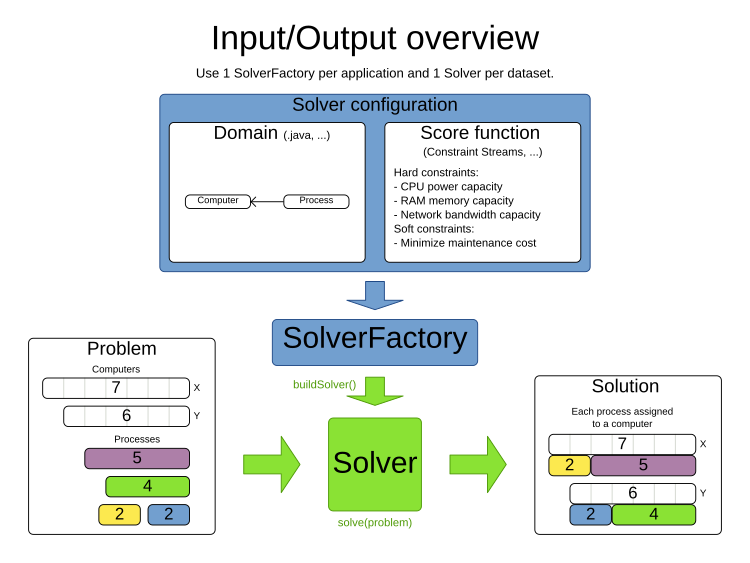
Regardless of mode, the following steps and concepts apply:

  1. Model your planning problem as a class annotated with @PlanningSolution, for example Timetable.

  2. Define constraints using a ConstraintProvider that expresses hard and soft rules.

  3. Submit your problem — via REST API (service) or Solver.solve() / SolverManager (library).

  4. Receive the best solution found within the configured time limit.
inputOutputOverview
  • © 2026 Timefold BV
  • Timefold.ai
  • Documentation
  • Changelog
  • Send feedback
  • Privacy
  • Legal
    • Light mode
    • Dark mode
    • System default